
Documentation
Everything you need to know about syncing WhatsApp conversations to Attio CRM in real-time.
Video Walkthroughs
Watch step-by-step guides to get up and running in minutes.
Integration Walkthrough
Full YouTube Tutorial
Where Your Chats Show Up
If WhatsApp connected successfully but you do not see chats right away in Attio, this is the view to check first.
See Latest Chats In Attio
Your WhatsApp chats sync into the People object in Attio. To see the most recent activity first, sort the list by "Last WhatsApp Message At" in descending order.
Step 1
Open the People object in Attio.
Step 2
Add a sort on Last WhatsApp Message At.
Step 3
Set it to Descending to keep newest chats at the top.
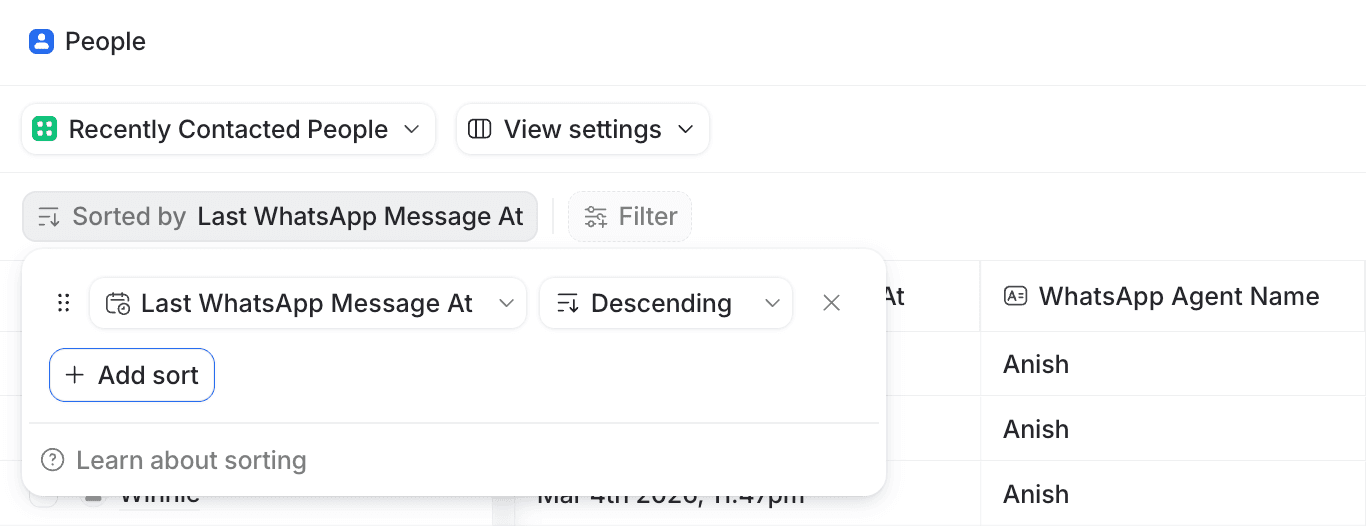
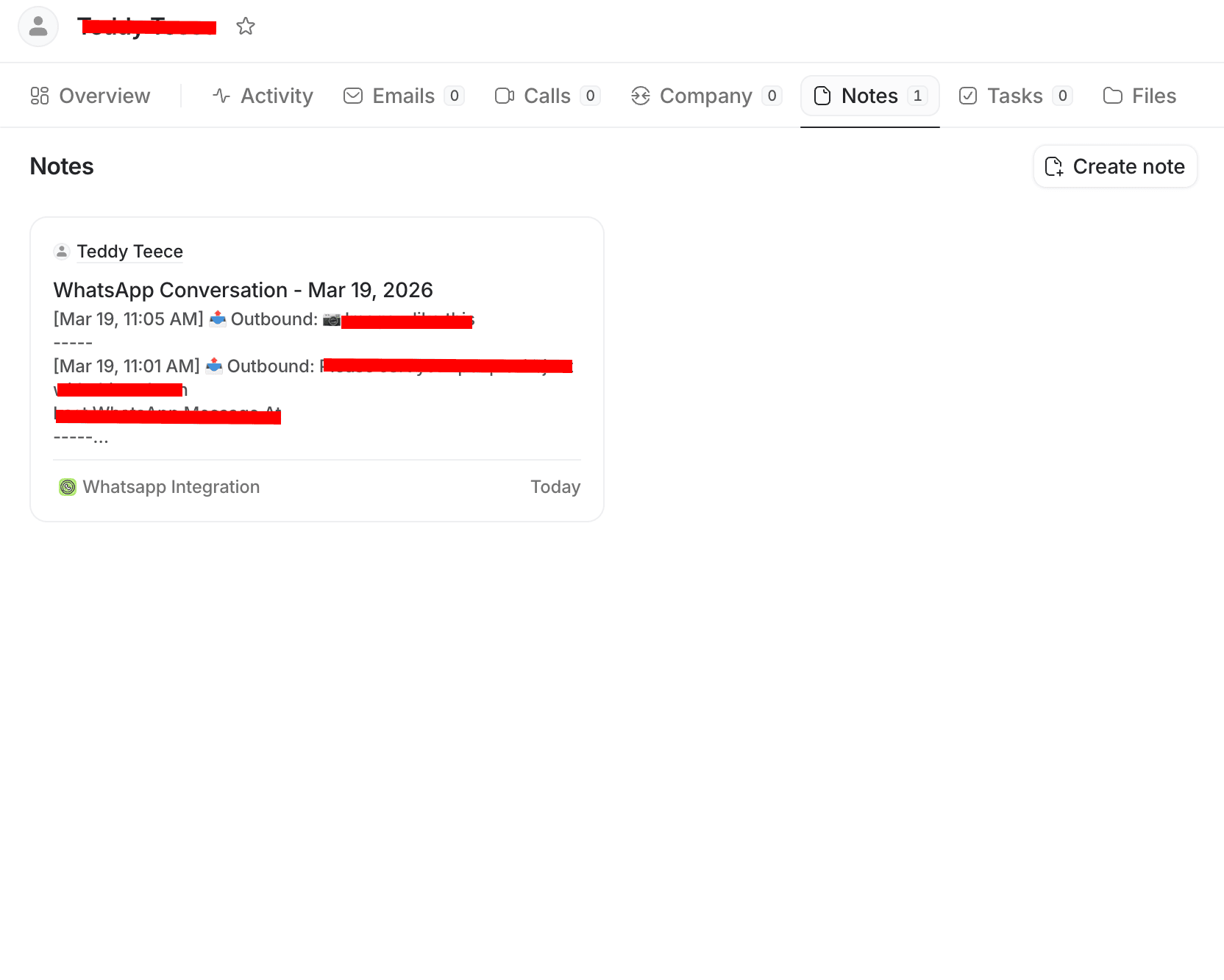
Inside each matching Person record, WhatsApp messages are also saved as Attio notes. That means the People list helps you find the right contact fast, and the record itself holds the actual synced conversation history.
Connected fine, but cannot see chats? This is usually the missing step. Share #find-your-chats to jump straight here.
Features
A detailed breakdown of everything WhatSync can do.
One-on-One Chat Sync
Every direct (1:1) WhatsApp message is automatically synced to Attio in near real-time. Both inbound and outbound messages are captured. Each message is logged as a note on the corresponding Person record in Attio, with full context including sender name, timestamp, and message direction.
Group Chat Sync
Group Chat Sync is available only on Linked WhatsApp. It is not available on the official WhatsApp Business API path. When you use Linked WhatsApp, each group you choose gets its own dedicated Person record in Attio, named after the group, and messages from group members are logged as notes with sender info attached.
Include / Exclude Mode
Full control over which phone numbers get synced. Two modes are available:
Exclude Mode (Default)
All WhatsApp numbers sync to Attio except the ones you add to the exclusion list. Ideal for blocking personal contacts or internal team numbers you don't want in your CRM.
Include Mode
Only the numbers you explicitly add to the inclusion list will sync. Everything else is ignored. Great for teams that want strict control over which contacts enter their CRM.
Auto-Include from Attio
When Include Mode is active, enable this option to automatically add numbers to your include list if they already exist as contacts in your Attio CRM. This means any WhatsApp number that matches an existing Attio person will automatically start syncing -- no manual entry needed.
Sync Sharing Mode
Control the level of data written into Attio for each WhatsApp interaction. Two options:
Full Access
Syncs full conversation notes including message content, plus all metadata fields (timestamps, counts, direction, agent info, conversation link).
Metadata Only
Only syncs interaction metadata (timestamps, message counts, direction, date fields, conversation link, agent info). No chat note content or message body text is written to Attio.
Contact Auto-Creation
When a WhatsApp message comes in from a number that doesn't exist in your Attio CRM, WhatSync automatically creates a new Person record for them. The contact is matched by phone number using configurable phone match fields.
Phone Match Fields
Configure which Attio fields WhatSync uses to match incoming WhatsApp numbers to existing CRM contacts. By default, the standard phone number field is used, but you can add custom fields to increase match accuracy for your specific CRM setup.
Timezone Settings
Set your timezone to ensure all message timestamps in Attio notes display in your local time. This affects how dates and times appear in the formatted notes synced to your CRM.
Team Access
Invite team members to share your Attio CRM connection. The owner manages the Attio connection and sync settings, while each member connects their own WhatsApp account. Messages from all team members sync into the same Attio workspace.
Magic Access Link
No passwords needed. WhatSync generates a unique, private access link for your account. Use it to log in from any device or browser instantly. The link can be revealed, copied, and hidden for security. Treat it like a password -- anyone with the link can access your account.
Real-Time Sync
Messages sync to Attio in near real-time. As soon as a WhatsApp message is sent or received, it appears in your CRM within seconds. No batch processing, no delays. Your sales team always has the latest conversation context.
14 Custom Attio Fields
WhatSync automatically creates 14 custom fields on your Attio Person records. These fields track last inbound/outbound messages, conversation dates, message counts, agent info, direct WhatsApp links, and more. Use them for filtering, sorting, and building reports in Attio.
Attio Fields Reference
Attio UI shows the Display Name. API calls and filters use the API Slug.
| Display Name | API Slug | Type | Status | Use Case |
|---|---|---|---|---|
| WhatsApp Phone Number (Raw) | whatsapp_phone_number | Text | Active | Raw WhatsApp identifier used as a reliable fallback key |
| Last Inbound WhatsApp Message | whatsapp_last_inbound_message | Text | Active | Most recent message received from the contact |
| Last Outbound WhatsApp Message | whatsapp_last_outbound_message | Text | Active | Most recent message you sent to the contact |
| Last Contact By Client | whatsapp_last_inbound_date | Date | Active | Date when the contact last messaged you |
| Last Contacted Client | whatsapp_last_outbound_date | Date | Active | Date when you last messaged the contact |
| WhatsApp Conversation Started | whatsapp_first_contact_date | Date | Active | First known WhatsApp interaction date |
| WhatsApp Conversation | whatsapp_conversation_link | Text | Active | Direct `wa.me` link to continue the chat |
| WhatsApp Message Text | whatsapp_message_text | Text | Active | Formatted snapshot of the latest tracked WhatsApp message |
| WhatsApp Message Date | whatsapp_message_date | Date | Active | Date of the latest tracked WhatsApp message for filtering/reporting |
| WhatsApp Message Direction | whatsapp_message_direction | Select | Active | Inbound/Outbound direction of the latest tracked WhatsApp message |
| Total WhatsApp Messages | whatsapp_total_messages | Number | Active | Running total of inbound + outbound WhatsApp messages |
| WhatsApp Agent Number | whatsapp_agent_number | Text | Active | Latest sending agent/business number used for sync |
| WhatsApp Agent Name | whatsapp_agent_name | Text | Active | Latest sending agent display name used for sync |
| Last WhatsApp Message At | whatsapp_last_message_at | Timestamp | Active | Sortable exact datetime of latest WhatsApp activity |
How It Works
Get set up in under 2 minutes.
Connect WhatsApp
Connect your WhatsApp Business account via the official Meta API. One-click authentication through Facebook.
Connect Attio
One-click OAuth connection to your Attio workspace.
Messages Sync
Every WhatsApp message now syncs to Attio CRM automatically.
Frequently Asked Questions
Everything you need to know about the integration
Ready to Get Started?
Set up the WhatsApp-Attio integration in under 2 minutes.